
On-the-go power measurement
Start Power Measurement with Ease
1. Enter Basic Vehicle Information in Settings
These details help the app calculate power data as accurately as possible for your specific vehicle.
- Mass: The weight of your vehicle, usually listed in the registration documents and owner’s manual. Be sure to account for passenger weight as well.
- Frontal Area: Represents the front-facing surface area of your vehicle. Find example values for common vehicle models [here].
- Drag Coefficient: Indicates the aerodynamics of the vehicle body. You can refer to sample values for popular models [here].
-
Rolling Resistance Coefficient: Rolling resistance is the force opposing tire movement. Clockwatts includes example values for different road surfaces, if needed.
2. Enable Phone Location Access
The Clockwatts app uses your phone’s location data to perform measurements. Location accuracy directly impacts measurement reliability.
- When you start a measurement, the app will request permission to use precise location data.
-
Pay attention to any factors that may reduce location accuracy.
3. Real-Time Power Measurement
No additional devices or connections to your car’s electrical system are needed. The Clockwatts app provides real-time performance data for your vehicle, showing both instantaneous and peak power in kilowatts.
- Instantaneous Power: The power output of your vehicle at any given moment. This helps you understand how different driving conditions impact power output.
-
Peak Power: The highest power level your vehicle reaches during the measurement.
- Remember safety: Use of this app is at your own risk.
4. Power Measurement Report
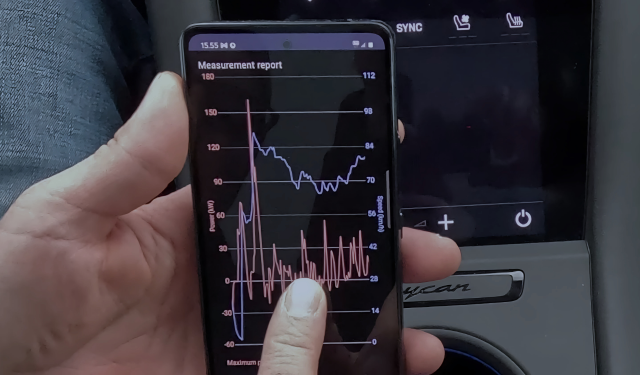
After you complete a measurement, you will receive a report showing data collected over the last 10–20 minutes, depending on your settings.
- The report includes a clear line graph displaying both power and speed over the measurement period.
- You can save the graph for future reference.
5. Tips for Maximum Accuracy
Follow these tips to ensure the most accurate results possible:
- Perform measurements on flat surfaces without elevation changes.
- Use precise, model-specific values in settings.
- Measure on dry, calm weather days.
- Ensure your phone is securely mounted.
- Minimize factors that may interfere with location accuracy.
Download Clockwatts and start measuring power easily and at an amazingly affordable price! Unlimited power measurements for just €9.99.
